Customizing Voice Address Messages
Voice address notifications require a Dialogic board or SIP Server and text-to-speech software. The text-to-speech software (Microsoft Speech API or MSSAPI) provides a method for you to customize the spoken text using Microsoft Speech Application Language Tags (SALT tags). These tags are specific XML tags and require the same structure as a properly structured XML document. (The tags are removed in email messages and alphanumeric pages.)
Commonly used tags are described in the following table.
Important Notes:
The full list of SALT tags and options is described in the Microsoft Speech API 5.1 documentation. This file is available on the Microsoft website. Search the document for "XML TTS Tutorial" for more information regarding the tags shown in the following table.
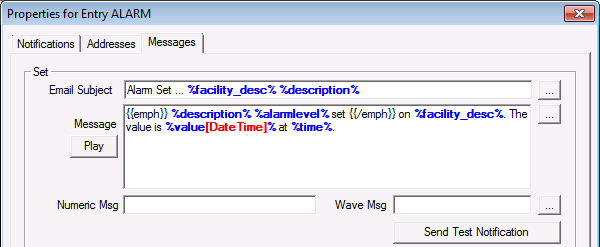
Tags are shown in Microsoft documentation enclosed in angle brackets. Angle brackets cannot be used in the GNS. They must be substituted with two curly brackets. For example, <emph> would be {{emph}}. See example below.
Quotation marks must be straight quotation marks and not curly quotation marks. The GNS editor uses straight quotes. If you copy and paste text into the editor the quotation marks are most likely curly. You will have to edit them in the GNS.
| Tag | Description | |
|---|---|---|
|
Spell |
Forces the voice to spell out the text.
The voice would say B, T, U. |
|
|
Emph |
Instructs the voice to emphasize a word or section of text. The tag cannot be empty. The method of emphasis may vary from voice to voice.
"Alarm set" would be emphasized. |
|
|
Silence |
Inserts a specified number of milliseconds of silence into the output audio stream. This tag must be empty, and must have one attribute: msec. The attribute value must be enclosed in single or double quotation marks.
A one second pause would be inserted prior to the voice stating the time of the alarm. |
|
|
Volume |
Controls the volume of a voice. The Volume tag has one required attribute: Level. The value of this attribute should be an integer between 0 and 100. Values outside of this range will be truncated. The attribute value must be enclosed in single or double quotation marks. The tag can be empty, in which case it applies to all subsequent text, or it can have content, in which case it only applies to that content. The GNS configuration file contains a default volume setting. Use this tag to override that setting.
The words "Evacuate immediately" would be spoken at full volume. |
|
|
Rate |
Controls the rate of a voice. The tag can be empty, in which case it applies to all subsequent text, or it can have content, in which case it only applies to that content. The Rate tag has two attributes, Speed and AbsSpeed, one of which must be present. The value of both of these attributes should be an integer between -10 and 10. The attribute value must be enclosed in single or double quotation marks. The AbsSpeed attribute controls the absolute rate of the voice, so a value of ten always corresponds to a value of ten, a value of five always corresponds to a value of five. The GNS configuration file contains a default rate setting. Use this tag to override that setting.
"the field office" would be spoken at a rate of 2. |
|
|
Pitch |
Controls the pitch of a voice. The tag can be empty, in which case it applies to all subsequent text, or it can have content, in which case it only applies to that content. The Pitch tag has two attributes, Middle and AbsMiddle, one of which must be present. The value of both of these attributes should be an integer between -10 and 10. The attribute value must be enclosed in single or double quotation marks. The GNS configuration file contains a default pitch setting. Use this tag to override that setting.
"a new truck" would be spoken at a pitch of 8. |
Example
Tags can be nested. Tokens can be used as the contents of a tag. See Using Tokens in Notifications.
|
Voice Address Message example |